MT5 automation
Lazy Trader Web Config Builder
Configure the plan canvas, start after, end at, time, direction, and models in one screen and export a compatible plan-*.cfg file.
The current version mirrors the advisor structure closely enough and exports one plan-config that can be dropped into MQL5/Files/ZEN/plan_cfg and loaded with LOAD inside the plan canvas.
Export plan cfg
plan-plan.cfg
The page downloads one `plan-*.cfg` file that already includes the models-pack. Inside the advisor, type only the suffix without `plan-`.
How to use it
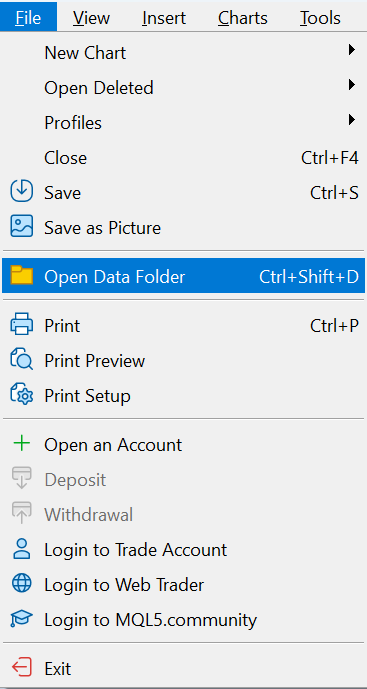
How to quickly find where to place the config file?
- Configure the tabs and choose the suffix for the plan config name.
- Press Export plan cfg. The page downloads a file like plan-your_name.cfg.
- Place that file into MT5 MQL5/Files/ZEN/plan_cfg.
- Inside the advisor plan canvas, type only the suffix, for example your_name, and press LOAD.
Full path for plan cfg: C:\Users\USERNAME\AppData\Roaming\MetaQuotes\Terminal\MANY-RANDOM-SYMBOLS\MQL5\Files\ZEN\plan_cfg
Important: the tester has its own sandbox. If you want this plan to be immediately available in the tester, place the file into Common\Files\ZEN\plan_cfg.
For macOS users, the idea is the same: find where the terminal's AppData physically lives and place the config file into the required folder.
Usually on macOS, the user's folder contains hidden files. The terminal's physical AppData is usually somewhere among them.
- In Finder, press Command + Shift + G and enter /Users, then open the user folder, for example /Users/Georg/.
- Inside the user folder, press Command + Shift + . to show hidden files and folders.
- Find the terminal folder among them. Example path: Libraries / Application Support / MetaTrader 5 / Bottles / MetaTrader5 / drive_c / Program Files / MetaTrader 5 / MQL5 / Files /.
- Your path may differ, for example: user / Library / Applications / net.metaquotes / drive_c / Program Files / MetaTrader / MQL / Files /. For Lazy Trader plan cfg, continue to ZEN/plan_cfg.