Lazy Trader
DIRECTION menu
How the Direction menu chooses the market side and how each mode changes the behavior of the plan.
Section video
The Direction menu is responsible for the side-selection logic of the plan. In the simplest cases that means longs only or shorts only. In more advanced cases it means letting the plan derive bias from opening ranges, swing structure, or moving-average relationships.
Choosing the right mode is less about complexity and more about where your edge actually lives. If the strategy already assumes a fixed directional context, long-only or short-only may be enough. If the bias should change with the chart, dynamic direction modes provide that layer without changing the underlying models.
The dynamic modes differ not only by signal source, but by how they refresh bias. box-config lives on recurring intraday ranges, swing-config reads one to three structural timeframes and can use 3- or 5-candle fractals, and MA-config simply compares fast and slow averages on the chosen timeframe.
Direction modes available in the product
- Longs only: every eligible model is allowed to work only on the long side.
- Shorts only: every eligible model is allowed to work only on the short side.
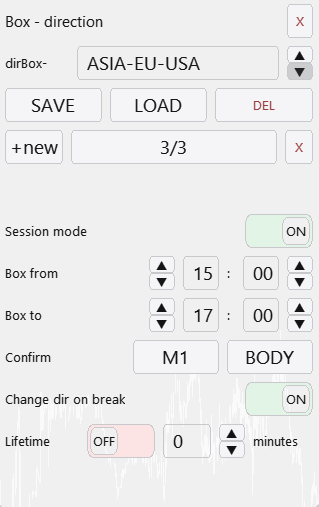
- box-config: direction based on time-framed opening ranges; once the range is confirmed, price above its high means long bias and price below its low means short bias, with the latest confirmed box taking control.
- MA-config: direction based on fast and slow moving-average relationships; fast above slow means long bias and fast below slow means short bias.
- Swing config: direction based on multi-timeframe swing-structure reading; if the selected structures disagree, the plan should not open new positions.
- Obsorbation: trade direction is calculated from the latest valid absorption pairs (candle absorptions) on one or more selected timeframes.
- FVG-config: the FVG direction parameters are grouped in a dedicated config.
Design implication
Direction should answer “which side is allowed”, not “where exactly do I enter”. That keeps the bias layer separate from the entry layer.
If your plan flips direction dynamically, revisit model-level settings such as Once. A model that should arm only once in one bias cycle may need different behavior after a direction flip.
With swing-based direction, remember that structure can exist in an unconfirmed state while the active leg is still developing. That is something to validate in the tester rather than hand-wave away in theory.
Other Lazy Trader sections
Config Mode and Lazy Trader 3 optimization
Config Mode turns dozens of Lazy Trader settings into controlled presets that can be iterated in Strategy Tester and then saved back into working plan cfg files.
Balanced Price Range (BPR)
BPR is the imbalance-compression model: it works with the overlap between opposite inefficiencies and lets you choose how deep into that balance zone entry should happen.
Moving Averages model
The MA model does more than “touch the fast average”: it also validates the nearest eligible fractal to the left before opening.
Classic Structure Reversal
Classic Reversal becomes relevant only when structure itself turns; it is not just a pullback model with a different stop.
Classic Structure via primary liquidity sweep
This variation opens on the first important structural violation and reads it as a sweep rather than as a full structural reversal.
Classic Structure Trend
Classic Trend participates on a pullback inside the active structure without requiring the structure direction itself to flip.
Classic Structure family
Classic Structure is the shared logic layer for three related pages: trend continuation, primary liquidity sweep, and reversal structure.
Larry-Williams model
Larry-Williams works with range extremes and supports both direct breakout continuation and return-entry logic after a raid back into the range.
Box-Fractal model
Box-Fractal uses a confirmed fractal range as the structural base for entry and stop placement rather than entering at the first raw extremum.
Market entry model
The Market model enters as soon as the shared gate allows model search and uses its own rearm options to control repeated openings.
Base config
Base config is the shared risk and management layer that sits under each model and keeps model-specific logic from drifting into risk chaos.
Position Manager
Position Manager gives each open trade its own chart-level button and lets you adjust takes, breakeven, stop-loss, and level sizing without leaving the Lazy Trader workflow.
STATUS canvas
Status canvas merges Direction, Start After, End At, Time, and Models into one live state map, so you can see what is aligned, what is still pending, and why the plan is running or waiting.
MODELS menu
Models are the executable entry modules inside the plan, and the menu is built to let many different model types coexist under one scenario.
START AFTER menu
Start After does not pick the side of the trade; it defines what must happen before the plan is allowed to begin evaluating entries at all.
Automatic direction detection
This section explains the combined logic of Direction plus Start After, which is where many users actually shape the market bias of the plan.
TIME menu
TIME is where session logic lives: windows, overnights, weekday permissions, daily close, Friday close, and broker-specific timing constraints.
END AT menu
END AT defines when the plan stops looking for new positions, which is different from instantly flattening every already-open trade.
plan-*.cfg generator for AI agents
A machine-readable StrategySpec contract with an embedded compiler and validator for universal trading plans.
PLAN menu
PLAN is the root canvas: it is where risk, entry/stop/take, and the links to every other menu become one executable scenario.
What Lazy Trader does
Use this page when the main question is not “which button do I press”, but “what role does Lazy Trader play in the workflow at all”.