Lazy Trader
Base config
Shared model settings for risk sizing, limits, breakeven, take-profits, stop validation, and reusable management rules.
Section video
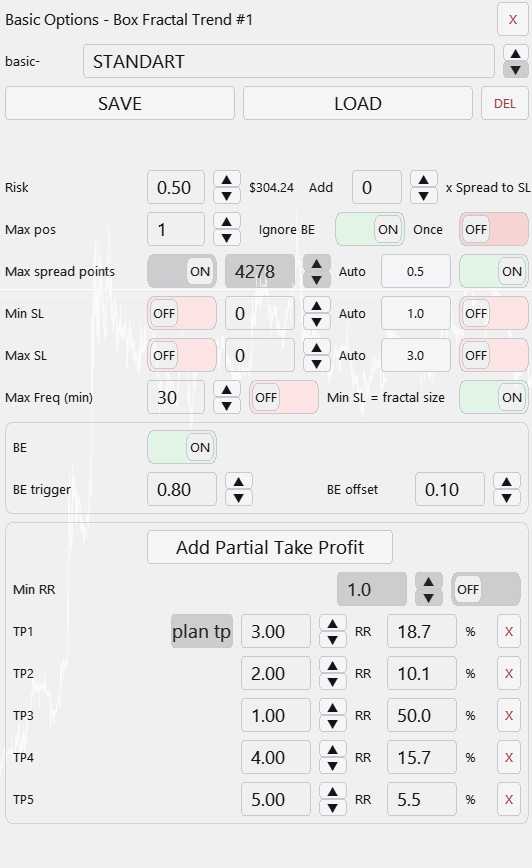
Base config is the common management layer available to every model type. The model-specific config defines where and why an entry happens; the base config defines how that entry should behave from a risk and management standpoint.
That split is crucial. It means you can compare different entry ideas while keeping one consistent framework for risk share, simultaneous-position limits, breakeven handling, frequency limits, partial take, and the link between model exits and plan take. A value such as 0.05 here means 5% of the total plan risk, not 5% of account balance directly.
The shared settings typically cover:
- risk share per trade inside the total plan risk.
- Maximum number of simultaneously open positions for this config.
- Once: after the first opening, the model stops itself while the rest of the plan can continue running.
- Minimum and maximum stop filters in points.
- Fractal-based stop enlargement when the model stop is too tight.
- Maximum entry frequency by fractal type and timeframe in choppy conditions.
- breakeven trigger and BE-offset logic.
- Multi-target take-profit handling with even volume distribution and optional plan take integration.
Two built-in filters always stay on
A trade is skipped if the stop is narrower than two current spreads.
A trade is skipped if the stop is narrower than half of the candle range on that timeframe.
Those filters matter because they stop the plan from pretending an unrealistic stop is executable in live conditions.
Changes to breakeven and take-profit settings immediately alter model previews and chart visualization, which makes Base config a practical shared management template across several models.
Other Lazy Trader sections
Config Mode and Lazy Trader 3 optimization
Config Mode turns dozens of Lazy Trader settings into controlled presets that can be iterated in Strategy Tester and then saved back into working plan cfg files.
Balanced Price Range (BPR)
BPR is the imbalance-compression model: it works with the overlap between opposite inefficiencies and lets you choose how deep into that balance zone entry should happen.
Moving Averages model
The MA model does more than “touch the fast average”: it also validates the nearest eligible fractal to the left before opening.
Classic Structure Reversal
Classic Reversal becomes relevant only when structure itself turns; it is not just a pullback model with a different stop.
Classic Structure via primary liquidity sweep
This variation opens on the first important structural violation and reads it as a sweep rather than as a full structural reversal.
Classic Structure Trend
Classic Trend participates on a pullback inside the active structure without requiring the structure direction itself to flip.
Classic Structure family
Classic Structure is the shared logic layer for three related pages: trend continuation, primary liquidity sweep, and reversal structure.
Larry-Williams model
Larry-Williams works with range extremes and supports both direct breakout continuation and return-entry logic after a raid back into the range.
Box-Fractal model
Box-Fractal uses a confirmed fractal range as the structural base for entry and stop placement rather than entering at the first raw extremum.
Market entry model
The Market model enters as soon as the shared gate allows model search and uses its own rearm options to control repeated openings.
START AFTER menu
Start After does not pick the side of the trade; it defines what must happen before the plan is allowed to begin evaluating entries at all.
DIRECTION menu
Direction defines whether the plan is fixed long-only, fixed short-only, or dynamically biased through box, MA, swing, absorption, or FVG logic.
Automatic direction detection
This section explains the combined logic of Direction plus Start After, which is where many users actually shape the market bias of the plan.
TIME menu
TIME is where session logic lives: windows, overnights, weekday permissions, daily close, Friday close, and broker-specific timing constraints.
END AT menu
END AT defines when the plan stops looking for new positions, which is different from instantly flattening every already-open trade.
plan-*.cfg generator for AI agents
A machine-readable StrategySpec contract with an embedded compiler and validator for universal trading plans.
PLAN menu
PLAN is the root canvas: it is where risk, entry/stop/take, and the links to every other menu become one executable scenario.
What Lazy Trader does
Use this page when the main question is not “which button do I press”, but “what role does Lazy Trader play in the workflow at all”.