Lazy Trader
Larry-Williams model
A range-extreme model built around medium- or long-term fractal boundaries and optional reversal entry after a failed break.
Section video
The Larry-Williams model uses medium-term and long-term fractal extremes as range boundaries. The idea is not to chase impulse, but to work from the edges of a range: long from the lower boundary and short from the upper boundary.
The distinctive setting here is Open on reversal. Instead of entering immediately on a break, the model can wait for price to step outside the range and then close back inside on the chosen timeframe. That behavior reframes the break as a raid and turns the entry into a reversal-style participation rather than a continuation.
Key configuration levers
- Search timeframe, fractal type, and candle count.
- Lifetime of the tracked structure.
- Immediate entry versus return entry after reversal.
- Entry level and stop level measured against the tracked range.
Interpretation
This model is useful when you care about the behavior around range extremes, not only about directional bias.
lifetime often becomes the decisive parameter here: the larger it is, the more old formations stay eligible even after they have lost relevance to the current range context.
Open on reversal can materially change the character of the model, so it should be tested as a separate hypothesis rather than as a cosmetic toggle.
Interactive schematic
How settings reshape the model
The diagram follows the model’s trading logic. Change local values to track Entry, Stop Loss, Take Profit and Break Even without changing the advisor configuration.
LW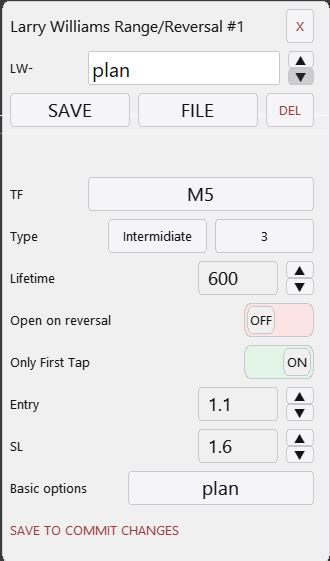
Other Lazy Trader sections
Config Mode and Lazy Trader 3 optimization
Config Mode turns dozens of Lazy Trader settings into controlled presets that can be iterated in Strategy Tester and then saved back into working plan cfg files.
Balanced Price Range (BPR)
BPR is the imbalance-compression model: it works with the overlap between opposite inefficiencies and lets you choose how deep into that balance zone entry should happen.
Moving Averages model
The MA model does more than “touch the fast average”: it also validates the nearest eligible fractal to the left before opening.
Classic Structure Reversal
Classic Reversal becomes relevant only when structure itself turns; it is not just a pullback model with a different stop.
Classic Structure via primary liquidity sweep
This variation opens on the first important structural violation and reads it as a sweep rather than as a full structural reversal.
Classic Structure Trend
Classic Trend participates on a pullback inside the active structure without requiring the structure direction itself to flip.
Classic Structure family
Classic Structure is the shared logic layer for three related pages: trend continuation, primary liquidity sweep, and reversal structure.
Box-Fractal model
Box-Fractal uses a confirmed fractal range as the structural base for entry and stop placement rather than entering at the first raw extremum.
Market entry model
The Market model enters as soon as the shared gate allows model search and uses its own rearm options to control repeated openings.
Base config
Base config is the shared risk and management layer that sits under each model and keeps model-specific logic from drifting into risk chaos.
Position Manager
Position Manager gives each open trade its own chart-level button and lets you adjust takes, breakeven, stop-loss, and level sizing without leaving the Lazy Trader workflow.
STATUS canvas
Status canvas merges Direction, Start After, End At, Time, and Models into one live state map, so you can see what is aligned, what is still pending, and why the plan is running or waiting.
MODELS menu
Models are the executable entry modules inside the plan, and the menu is built to let many different model types coexist under one scenario.
START AFTER menu
Start After does not pick the side of the trade; it defines what must happen before the plan is allowed to begin evaluating entries at all.
DIRECTION menu
Direction defines whether the plan is fixed long-only, fixed short-only, or dynamically biased through box, MA, swing, absorption, or FVG logic.
Automatic direction detection
This section explains the combined logic of Direction plus Start After, which is where many users actually shape the market bias of the plan.
TIME menu
TIME is where session logic lives: windows, overnights, weekday permissions, daily close, Friday close, and broker-specific timing constraints.
END AT menu
END AT defines when the plan stops looking for new positions, which is different from instantly flattening every already-open trade.
plan-*.cfg generator for AI agents
A machine-readable StrategySpec contract with an embedded compiler and validator for universal trading plans.
PLAN menu
PLAN is the root canvas: it is where risk, entry/stop/take, and the links to every other menu become one executable scenario.
What Lazy Trader does
Use this page when the main question is not “which button do I press”, but “what role does Lazy Trader play in the workflow at all”.