Lazy Trader
END AT menu
Rules for terminating the search for new entries and switching the plan off without breaking management logic for existing trades.
Section video
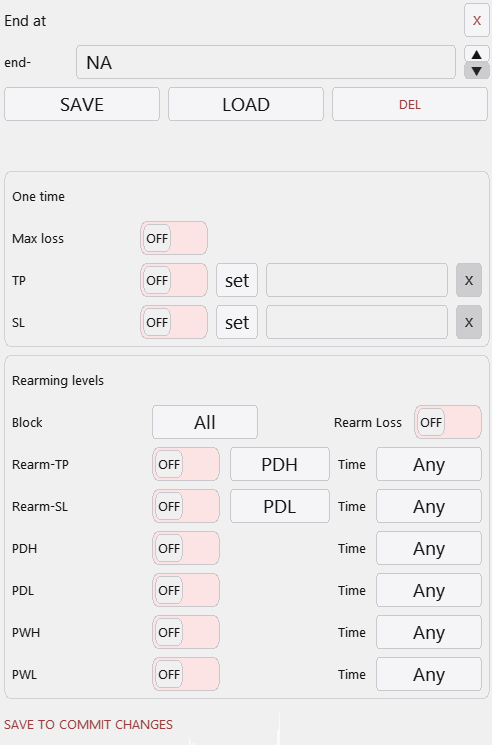
The End At menu is the shutdown logic for the plan. Its job is to say: “from this point forward, stop searching for any new trades under this scenario”. That is a cleaner and safer concept than a blanket emergency close, because the system can still keep managing positions that were already opened under valid conditions.
This distinction is important for backtesting and live execution alike. A plan may stop accepting new entries because a take objective was reached, because a stop threshold was hit, because a maximum-loss condition fired, or because the valid trading period has ended. Existing positions can still complete their own logic if that is how the scenario was designed.
Typical END AT triggers:
- The plan take or another plan-level target is reached.
- A plan-level stop condition or invalidation says the scenario is moving the wrong way.
- The maximum drawdown threshold is reached, so the idea should stop adding new positions.
- The time window, daily close, or Friday close has been reached, so the plan must stop arming new entries.
Why this menu matters
END AT prevents “scenario drift”. A plan that does not know when to stop can stay armed long after its original context is gone.
The cleaner your end conditions are, the easier it is to interpret tester results. You can tell whether a plan failed because the setup logic was poor, or because the shutdown logic was too loose.
Other Lazy Trader sections
Config Mode and Lazy Trader 3 optimization
Config Mode turns dozens of Lazy Trader settings into controlled presets that can be iterated in Strategy Tester and then saved back into working plan cfg files.
Balanced Price Range (BPR)
BPR is the imbalance-compression model: it works with the overlap between opposite inefficiencies and lets you choose how deep into that balance zone entry should happen.
Moving Averages model
The MA model does more than “touch the fast average”: it also validates the nearest eligible fractal to the left before opening.
Classic Structure Reversal
Classic Reversal becomes relevant only when structure itself turns; it is not just a pullback model with a different stop.
Classic Structure via primary liquidity sweep
This variation opens on the first important structural violation and reads it as a sweep rather than as a full structural reversal.
Classic Structure Trend
Classic Trend participates on a pullback inside the active structure without requiring the structure direction itself to flip.
Classic Structure family
Classic Structure is the shared logic layer for three related pages: trend continuation, primary liquidity sweep, and reversal structure.
Larry-Williams model
Larry-Williams works with range extremes and supports both direct breakout continuation and return-entry logic after a raid back into the range.
Box-Fractal model
Box-Fractal uses a confirmed fractal range as the structural base for entry and stop placement rather than entering at the first raw extremum.
Market entry model
The Market model enters as soon as the shared gate allows model search and uses its own rearm options to control repeated openings.
Base config
Base config is the shared risk and management layer that sits under each model and keeps model-specific logic from drifting into risk chaos.
Position Manager
Position Manager gives each open trade its own chart-level button and lets you adjust takes, breakeven, stop-loss, and level sizing without leaving the Lazy Trader workflow.
STATUS canvas
Status canvas merges Direction, Start After, End At, Time, and Models into one live state map, so you can see what is aligned, what is still pending, and why the plan is running or waiting.
MODELS menu
Models are the executable entry modules inside the plan, and the menu is built to let many different model types coexist under one scenario.
START AFTER menu
Start After does not pick the side of the trade; it defines what must happen before the plan is allowed to begin evaluating entries at all.
DIRECTION menu
Direction defines whether the plan is fixed long-only, fixed short-only, or dynamically biased through box, MA, swing, absorption, or FVG logic.
Automatic direction detection
This section explains the combined logic of Direction plus Start After, which is where many users actually shape the market bias of the plan.
TIME menu
TIME is where session logic lives: windows, overnights, weekday permissions, daily close, Friday close, and broker-specific timing constraints.
plan-*.cfg generator for AI agents
A machine-readable StrategySpec contract with an embedded compiler and validator for universal trading plans.
PLAN menu
PLAN is the root canvas: it is where risk, entry/stop/take, and the links to every other menu become one executable scenario.
What Lazy Trader does
Use this page when the main question is not “which button do I press”, but “what role does Lazy Trader play in the workflow at all”.