Lazy Trader
MODELS menu
How the Models menu organizes separate entry modules, enables or disables them, and keeps each one on dedicated config.
Section video
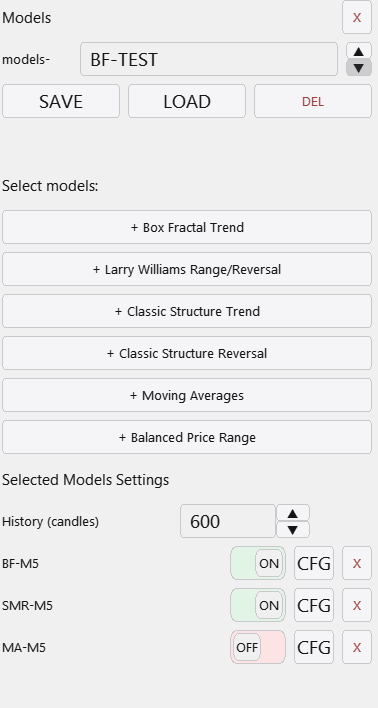
The Models menu is where the actual entry engines live. A single plan can contain one model or many, each with its own type, timeframe, configuration name, and shared Base config connection. This is what turns Lazy Trader into a scenario framework rather than a single-pattern advisor.
Operationally, each row in the model list is a unit with its own visibility state, on/off state, config, and removal control. That makes it possible to compare models inside one plan, keep weak ones disabled while preserving the broader scenario, and iterate without rebuilding the whole structure from scratch.
There is no meaningful hard limit on how many models can live inside one plan. You can keep one, two, or many variations as long as each one has a clear role and a defensible place inside the broader risk layer.
The Models menu helps you manage:
- Which model families participate in the same plan: Market, Box Fractal, Larry Williams, Classic Trend, Classic Reversal, Moving Averages, BPR, and other available configs.
- Which models are merely visible and which are actually active.
- Which configuration name and which Base config each model loads from.
- How models are sequenced through the First / Then schema.
What one model row means
- Show / Hide: visual logic only on the chart and in previews.
- On / Off: whether the model is truly allowed to participate in live entry search.
- Cfg: open and bind the dedicated model configuration.
Workflow value
Once a plan contains several models, the tester and journal become much more informative. You can observe not only the plan result, but which model family actually contributed to it.
That is a practical advantage over informal discretionary execution, where several ideas often blend together and become hard to evaluate separately.
Other Lazy Trader sections
Config Mode and Lazy Trader 3 optimization
Config Mode turns dozens of Lazy Trader settings into controlled presets that can be iterated in Strategy Tester and then saved back into working plan cfg files.
Classic Structure Reversal
Classic Reversal becomes relevant only when structure itself turns; it is not just a pullback model with a different stop.
Classic Structure via primary liquidity sweep
This variation opens on the first important structural violation and reads it as a sweep rather than as a full structural reversal.
Classic Structure Trend
Classic Trend participates on a pullback inside the active structure without requiring the structure direction itself to flip.
Position Manager
Position Manager gives each open trade its own chart-level button and lets you adjust takes, breakeven, stop-loss, and level sizing without leaving the Lazy Trader workflow.
STATUS canvas
Status canvas merges Direction, Start After, End At, Time, and Models into one live state map, so you can see what is aligned, what is still pending, and why the plan is running or waiting.
START AFTER menu
Start After does not pick the side of the trade; it defines what must happen before the plan is allowed to begin evaluating entries at all.
DIRECTION menu
Direction defines whether the plan is fixed long-only, fixed short-only, or dynamically biased through box, MA, swing, absorption, or FVG logic.
Automatic direction detection
This section explains the combined logic of Direction plus Start After, which is where many users actually shape the market bias of the plan.
TIME menu
TIME is where session logic lives: windows, overnights, weekday permissions, daily close, Friday close, and broker-specific timing constraints.
END AT menu
END AT defines when the plan stops looking for new positions, which is different from instantly flattening every already-open trade.
plan-*.cfg generator for AI agents
A machine-readable StrategySpec contract with an embedded compiler and validator for universal trading plans.
PLAN menu
PLAN is the root canvas: it is where risk, entry/stop/take, and the links to every other menu become one executable scenario.
What Lazy Trader does
Use this page when the main question is not “which button do I press”, but “what role does Lazy Trader play in the workflow at all”.