Magic Entry via Market

Install and update steps via MQL5 Market, including direct anchors for #install and #update.

Back to Magic Entry

FAQ: how to install and update Magic Entry via Market

Both actions are done directly in MetaTrader 5 using the same MQL5.com account that purchased the script.

How to install?

  1. Open the MetaTrader 5 terminal.
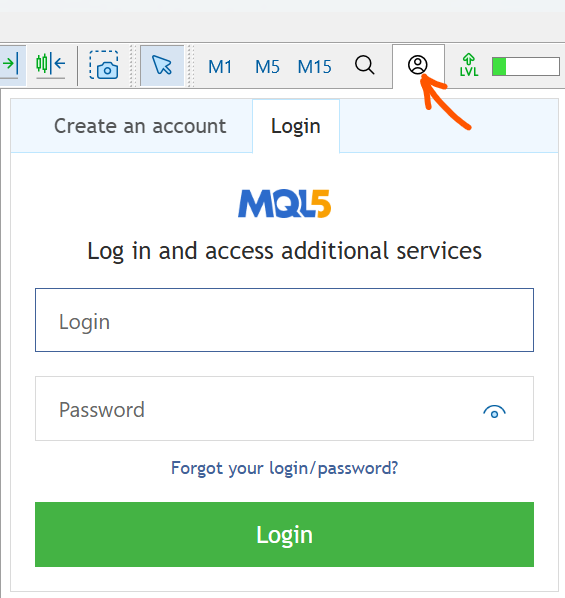
  2. Log in to the MQL5.com account used to buy the script.
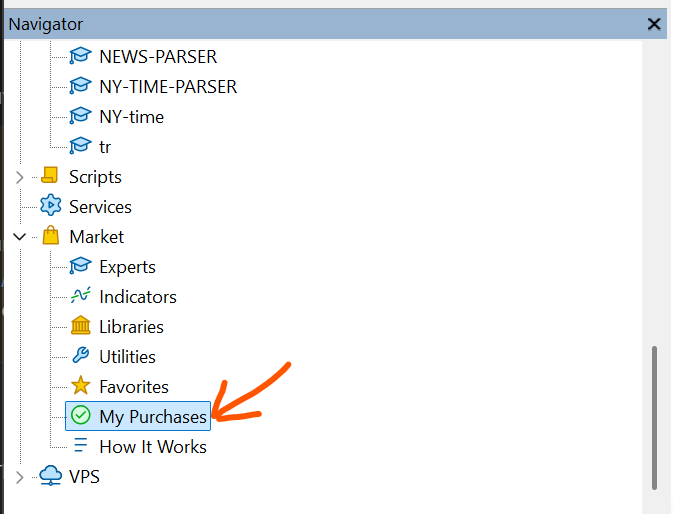
  3. Open Market -> My Purchases.
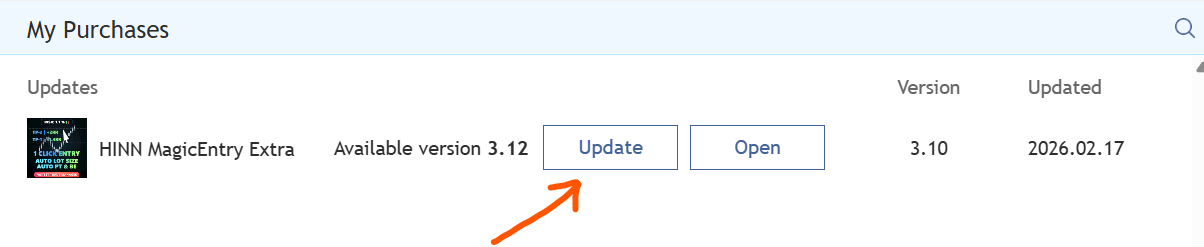
  4. Find the product and click Install.

How to update?

  1. Open the MetaTrader 5 terminal.
  2. Log in to the MQL5.com account used to buy the script.
  3. Open Market -> My Purchases.
  4. Find the product and click Update.
MQL5 account login in MetaTrader 5
1) Log in to your MQL5 account in the terminal.
My Purchases section in MetaTrader 5
2) Open Market -> My Purchases.
Update and Install buttons in MetaTrader 5
3) Click Update or Install for the needed product.