Lazy Trader
PLAN menu
How the PLAN menu acts as the single source of truth for the full Lazy Trader scenario.
Section video
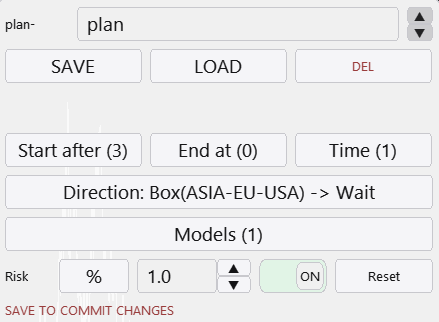
The trade plan canvas is the control layer above every other Lazy Trader block. When the plan toggle is off, no new entries are searched for. When it is enabled, the system starts checking Start After, Direction, Time, End At, and Models according to one coherent logic chain.
This matters because the plan is not just a navigation menu. It is the place where entry price, stop, take, risk mode, and high-level execution logic are coordinated. Without that central layer, the rest of the menus would behave like isolated settings rather than one scenario.
In practical terms, a trade plan is a compact answer to several questions: when to start searching for positions, which market side is allowed, when to stop searching, which entry models may participate, when the plan must stay inactive, and how much total risk is allocated to the idea.
The PLAN layer usually answers these questions:
- When is the plan allowed to begin searching for positions at all?
- Which bias is allowed: long, short, or a dynamic directional regime?
- When must the search for new trades stop: at target, on invalidation, or at maximum drawdown?
- Which entry models participate and how do they share risk share?
- What timing restrictions are part of the idea?
- What total risk and management behavior are acceptable for this scenario?
Operational reading
Think of the plan as the contract between your idea and the platform. It is where the intent becomes precise enough for the terminal to execute without improvisation.
A strong plan is usually simple at the top level and specific in the supporting menus. That keeps the operating flow readable when you later test, optimize, or explain the setup to yourself.
A good first draft of the plan can be assembled quickly and then validated in the tester. The point is not to write a perfect description on day one, but to get to a testable scenario as early as possible.
Other Lazy Trader sections
Config Mode and Lazy Trader 3 optimization
Config Mode turns dozens of Lazy Trader settings into controlled presets that can be iterated in Strategy Tester and then saved back into working plan cfg files.
Balanced Price Range (BPR)
BPR is the imbalance-compression model: it works with the overlap between opposite inefficiencies and lets you choose how deep into that balance zone entry should happen.
Moving Averages model
The MA model does more than “touch the fast average”: it also validates the nearest eligible fractal to the left before opening.
Classic Structure Reversal
Classic Reversal becomes relevant only when structure itself turns; it is not just a pullback model with a different stop.
Classic Structure via primary liquidity sweep
This variation opens on the first important structural violation and reads it as a sweep rather than as a full structural reversal.
Classic Structure Trend
Classic Trend participates on a pullback inside the active structure without requiring the structure direction itself to flip.
Classic Structure family
Classic Structure is the shared logic layer for three related pages: trend continuation, primary liquidity sweep, and reversal structure.
Larry-Williams model
Larry-Williams works with range extremes and supports both direct breakout continuation and return-entry logic after a raid back into the range.
Box-Fractal model
Box-Fractal uses a confirmed fractal range as the structural base for entry and stop placement rather than entering at the first raw extremum.
Market entry model
The Market model enters as soon as the shared gate allows model search and uses its own rearm options to control repeated openings.
Base config
Base config is the shared risk and management layer that sits under each model and keeps model-specific logic from drifting into risk chaos.
Position Manager
Position Manager gives each open trade its own chart-level button and lets you adjust takes, breakeven, stop-loss, and level sizing without leaving the Lazy Trader workflow.
Automatic direction detection
This section explains the combined logic of Direction plus Start After, which is where many users actually shape the market bias of the plan.
plan-*.cfg generator for AI agents
A machine-readable StrategySpec contract with an embedded compiler and validator for universal trading plans.
What Lazy Trader does
Use this page when the main question is not “which button do I press”, but “what role does Lazy Trader play in the workflow at all”.